Free Fire India event eligibility starts with the account and client you are using. If an event is missing, a region message appears or a reward seems attached to the wrong character, repeating the login may not solve the underlying mismatch. First establish which version accepts your existing account and which character the event page has selected.
Garena’s India account information, updated on 28 October 2026, identifies Free Fire India as a separate version for India-region accounts. It explains login messages and an important Apple ID distinction. These are account-access rules; they do not establish that every globally announced campaign runs in the same form on every compatible account.
Fepals Free Fire walks through the checks that matter before an event claim. You will learn what the region messages mean, why a new character can appear with Apple ID and how to route an unresolved issue to official support with useful account and event evidence.
Match the client to the account region
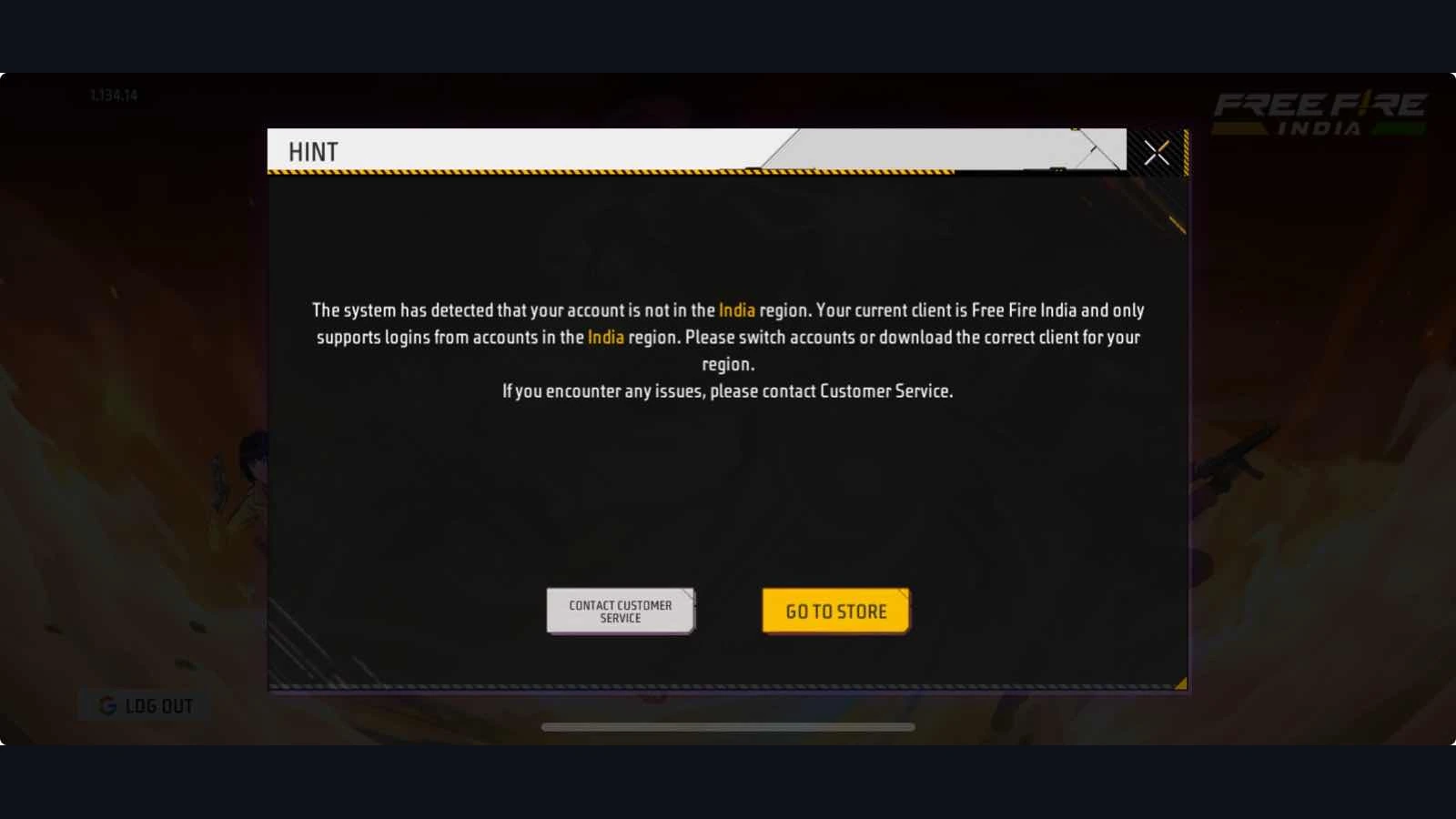
The official Free Fire India account explanation says India-region accounts cannot be used with Free Fire or Free Fire MAX and should use Free Fire India. Conversely, an account outside the India region cannot log in to FFI. The account’s region and the version accepting it matter more than a friend’s device or the language of a promotional post.
Fepals Free Fire recommends reading the exact message before taking action. A registration message detecting India concerns registering through the wrong version; Garena advises checking that a VPN or proxy is not changing the region and using the latest FFI client from the India store. An existing-account message concerns the region already attached to the account.
For a non-India account rejected by FFI, Garena directs players to the correct regional client, describing Free Fire MAX on Android and Free Fire on iOS, through the message’s store button. Do not interpret that instruction as permission to change an account’s region or bypass restrictions. Your immediate goal is access to the correct existing character.
Once the correct client opens, the Storm Arena reward checks show why a global announcement remains separate from local availability. Confirm the event panel and individual item conditions instead of assuming that a working login alone guarantees access to every campaign.
Check character identity before claiming
Garena warns that using the same Apple ID to log in to FFI can create a new FFI account rather than automatically linking or transferring an existing Free Fire MAX account. The explanation attributes this to separate Apple developer accounts. The original FFM account remains unaffected, but the newly created character should not be mistaken for your previous progress.
For Fepals Free Fire readers, that means checking the displayed UID, nickname and inventory before collecting a time-limited reward or making a purchase. If those details differ from the account you intended to use, stop and establish which character is active. Do not assume that an empty inventory means your old items were deleted.
The same official account information says external Apple ID login, including redemption and customer service websites, may ask you to choose the client version and confirm account details. That confirmation is relevant to the official redemption process: successful sign-in is only useful when the website has identified the character you intended.
Separate event eligibility from an event fault
After confirming the account, inspect the event’s own rules. Garena’s India event support article distinguishes daily tasks, login rewards, top-up promotions, Luck Royale and web events. Each route involves different checks. An available login reward, for example, does not establish that the same character has fulfilled a top-up threshold or a task in a specific mode.
Write down what you observe: the client, exact event name, visible opening or closing information, requirement and any error. If the event is absent, describe that absence accurately. Do not report an item as successfully claimed when you only saw it in an announcement. The distinction helps support understand whether the issue concerns access, participation or delivery.
The official request instructions say that entering Customer Service through the game signs you in automatically; an external browser requires login. The form pre-fills the UID and nickname. Check those details before submitting and select the relevant problem category. Event Issue covers event-related access and claim problems; account access problems need the corresponding account route.
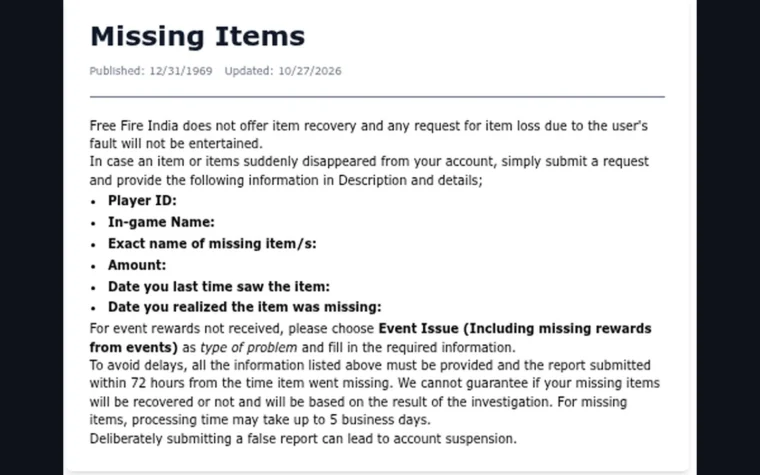
For an unlocked item that still cannot be located, the missing reward reporting process offers a more focused checklist. Keep screenshots of the event requirement and result, and provide what the official form requests. Credentials and verification codes should not be sent to a third-party reward page.
Mistakes to Avoid
Do not treat all login methods as interchangeable. The updated account information says FFI does not support VK and describes account recovery through an already bound recovery email as an option for affected existing users. Follow the current account-specific instructions; an older generic list of social login buttons should not override the newer client explanation.
Fepals Free Fire also advises against resetting or reinstalling before securing guest progress. Garena’s request instructions say guest data is stored on the device and cannot be restored if the device or data is lost. A missing event is not a good reason to discard an account’s only local copy.
Two Final Recommendations
First, keep a private note of your intended character’s UID, nickname and login platform. Compare those details whenever you switch clients or use an external event page. This makes a separate new character easier to recognise before you spend money or claim an account-bound reward.
Second, use Fepals Free Fire as a checklist while following the current official account instructions. If a region message persists, send its exact wording through the appropriate support route and include the client you used, rather than trying random downloads or creating more accounts.
Conclusion
Free Fire India event eligibility depends first on using the appropriate client with the intended account. FFI’s India-region rules and the Apple ID account distinction can explain access problems before an event’s individual requirements even become relevant.
Read the region message, confirm the UID and nickname, then inspect the live event conditions. If the account is correct but an event or claim still fails, choose the appropriate official support category and provide clear evidence of the specific problem.
Fepals Free Fire recommends protecting existing progress while resolving access. Keep the original account identifiable, use official client directions and let the event’s actual rules determine whether the reward applies to you.