Missing event rewards need a careful check before a support report. A reward may require a separate claim, belong to a different event category or have conditions that were not completed. Start by identifying exactly what you expected, which account participated and what the event page showed when you finished.
Garena India documents how to classify event issues and what information is required for missing items. Its policy includes a 72-hour reporting window for items that went missing, a possible processing period of up to five business days and no guarantee of recovery. These rules do not promise compensation for an unclaimed reward or an unmet condition.
At Fepals Free Fire, you will learn how to separate a claim problem from a missing inventory item, preserve useful evidence and submit a report that accurately describes what happened. The aim is to make your next action clear, even when the outcome depends on an investigation.
Check Whether the Reward Was Earned and Claimed
Open the event information available on the affected account. Compare the reward’s exact name with the task, claim button and deadline. A progress bar, completed match or top-up receipt records one part of an activity; it does not by itself establish every condition for the advertised reward.
Garena’s event classification instructions distinguish daily tasks, Luck Royale, top-up promotions, login rewards and web events. They explicitly state that daily-task rewards must be claimed and that unclaimed rewards are forfeited without compensation. The checks in daily tasks and login rewards help explain why logging in or finishing a task can still require another action.
Fepals Free Fire recommends writing down what the interface actually displayed. Record “task complete but claim button failed” if that is what happened, rather than “reward stolen”. If you never saw a successful claim, say so. This distinction gives support a clearer starting point and prevents an assumption from becoming the central claim in your report.
Identify the Event and Gather Evidence
Different mechanisms need different evidence. For a random draw, the relevant question is which result was awarded, not which grand prize you hoped to receive. For a login event, note the login and claim status. For a web event, preserve its title and the page associated with your account.
For missing top-up rewards, Garena’s event instructions specifically request a screenshot of the Google Play receipt as proof. Check the promotion’s own qualifying requirements as well. The explanation of top-up event rewards and qualifying purchases is useful when a payment completed but the separate promotional reward is disputed.
Keep screenshots in their original form so the relevant labels and status remain understandable. Fepals Free Fire suggests collecting evidence before closing an error screen or losing access to an event page. Do not manufacture a successful claim image to fill a gap; describe the gap openly.
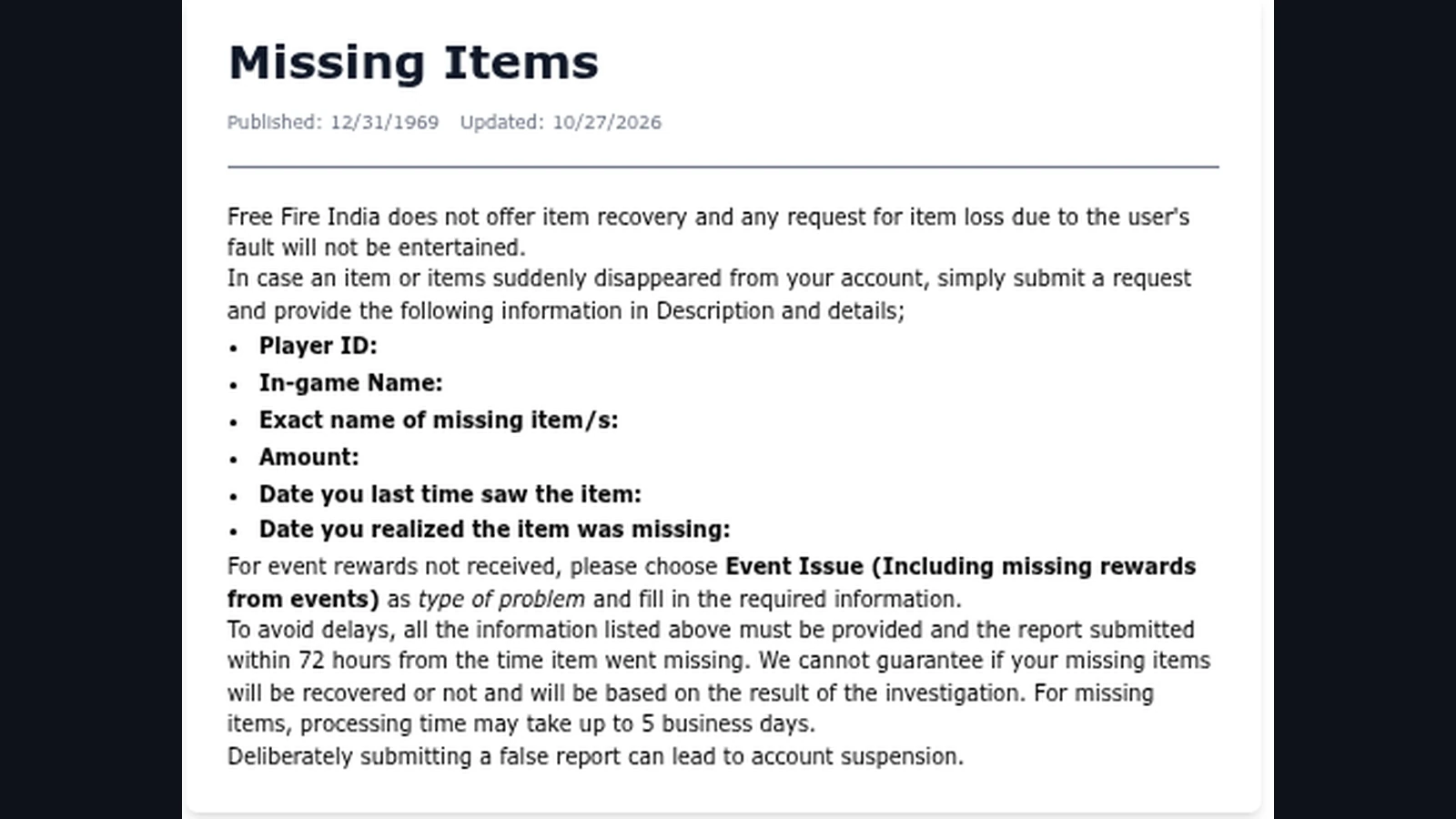
Garena’s Missing Items policy asks for Player ID, in-game name, the exact item name, amount and the dates it was last seen and noticed missing. It directs unreceived event rewards to “Event Issue (Including missing rewards from events)”. The same policy says to report within 72 hours from when an item went missing, warns that recovery is not guaranteed and allows up to five business days for missing-item processing.
When a reward never arrived, do not invent a “last seen” date. State that it was never received, identify the attempted claim time and complete the relevant event fields. Report promptly; the missing-item deadline is a reason to preserve facts quickly, not a reason to wait three days before contacting support.
Submit Through the Correct Account
Garena’s request submission instructions require a linked account and explain that opening Customer Service in-game logs you into the website. UID and nickname are prefilled in the ticket form and cannot be changed. Choose the problem category that matches the issue and provide every required field; the instructions say incomplete or incorrectly submitted requests may not be processed.
Check those account details before writing the description. India readers should use the account and client connected to the disputed activity, rather than assuming another profile contains the same history. Fepals Free Fire recommends keeping a short timeline: event name, required action, completion or purchase time, claim result and the moment you noticed the problem.
After submitting, keep the ticket reference and use the portal’s View Tickets area to read replies. If support asks for a specific missing detail, answer that request with the relevant evidence. For rewards connected to a code, first distinguish the redemption result from delivery using Garena’s official code redemption process.
Mistakes to Avoid
Do not report an unawarded random grand prize as missing simply because you used several draws. Do not treat a reward preview as proof of ownership. Similarly, an item that was never claimed is different from one that appeared in inventory and then disappeared.
Never deliberately submit a false report: Garena warns this can lead to suspension. Its policy also excludes item losses caused by the user’s fault. State uncertain details as uncertain and avoid promising yourself that a complete report guarantees restoration.
Two Final Recommendations
First, organise the report before sending it. Fepals Free Fire recommends a concise factual timeline followed by the exact reward and supporting screenshots. This makes it easier to understand the issue without requiring support to reconstruct the sequence from scattered statements.
Second, retain your evidence and check the existing ticket for a reply. Treat the stated processing period as an investigation allowance, not a guaranteed delivery date. If the event rules show that a required claim was missed, use that information to prevent the same problem next time.
Conclusion
Missing event rewards should be checked against the event’s requirements, claim status and actual result before reporting. The right next step depends on whether the problem concerns an unreceived event reward, a failed claim or an item that disappeared from inventory.
Use the affected linked account, select the appropriate event issue category and supply the required details honestly. Preserve evidence promptly and respect Garena’s missing-item reporting window without assuming that every report results in recovery.
Fepals Free Fire recommends making the record clear enough for another person to follow. A precise description cannot guarantee a reward, but it can establish what happened and give the investigation the information it needs.